NEW MEMBER
STEP 1 – CREATE A NEW APEEEL2 ACCOUNT
Important ! To ensure the validation of your new account upon payment, please register under the surname & first name of the bank account holder paying for your membership.
Click here to create a new account 
Data Protection: Your personal data will be treated with the upmost confidentiality and according to the current legislation in data protection. In creating your APEEEL2 Account, you expressly authorise APEEEL2 to contact you using the email address you have provided.
STEP 2 – PAY BY STANDING ORDER ON 1ST SEPTEMBER
Prior to booking any Periscolaire reservation during the online reservations opening (usually scheduled in mid-September) you must have paid your membership fee and your account must be (manually) validated by our team. In order to allow us time to process and validate your membership, we strongly recommend that you contact your bank directly and setup a standing order for an annual payment every 1st September.
If instead you choose to make a direct payment every year, please only do so from 1st July.
Due to administrative constraints, memberships may not be validated 2 working days prior and on the day of the opening of the Periscolaire reservations.
STEP 3 – ACCOUNT VALIDATION
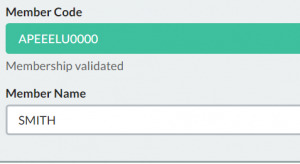
Once we have processed your payment, we will validate your online account and send you a confirmation email on your main email address.
THANK YOU AND WELCOME TO OUR ASSOCIATION !
RENEWING YOUR MEMBERSHIP
STEP 2 – PAY BY STANDING ORDER EVERY 1st SEPTEMBER
Prior to booking any Periscolaire reservation during the online reservations opening (usually scheduled in mid-September) you must have paid your membership fee and your account must be (manually) validated by our team, showing as VALIDATED. Only if you have not already done so, in order to allow us time to process and validate your membership, we strongly recommend that you contact your bank directly and setup a standing order for an annual payment every 1st September.
If instead you choose to make a direct payment every year, please only do so from 1st July.
Due to administrative constraints, memberships may not be validated 2 working days prior and on the day of the opening of the Periscolaire reservations.
STEP 3 – ACCOUNT VALIDATION
Once we have processed your payment, we will validate your online account and send you a confirmation email on your main email address.
THANK YOU FOR YOUR CONTINUED SUPPORT TO OUR ASSOCIATION !